📋 Table of Contents
BrowseAgent Full Demo
What Is BrowseAgent?
If you’ve been watching the AI marketing tool space, you’ve probably noticed a pattern: most tools generate text from a chat box. You type a prompt, you get output. Useful, but limited — because the AI only knows what it was trained on, not what’s happening on the web right now.
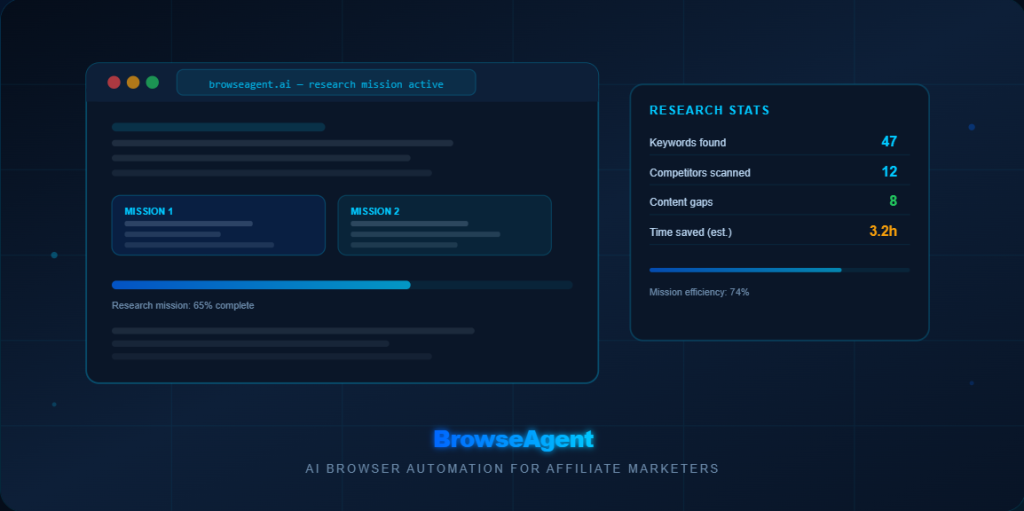
BrowseAgent is different. It’s an AI-powered browser automation tool, which means it can actually visit websites, read live pages, and return structured results based on what’s really out there today — not outdated training data from months ago.
Think of it as giving AI a real browser and a clear set of instructions. You describe the task — a “mission” — and BrowseAgent goes and executes it: visiting pages, extracting information, comparing results, and handing you back something you can actually use.
For affiliate marketers, content creators, and solo online business owners, this matters because research is one of the most time-consuming parts of the job. Finding the right keywords, checking what competitors are publishing, identifying content gaps, scanning for Pinterest angles — all of that requires a lot of manual browsing. BrowseAgent is designed to take a significant portion of that off your plate.
Who Is BrowseAgent For?
Based on its positioning and feature set, BrowseAgent appears best suited for:
- Beginner to intermediate affiliate marketers who spend too much time on manual research tasks
- Solo online business owners who want to work faster without hiring a virtual assistant
- Content creators and bloggers who need keyword research and competitor analysis without expensive SEO tools
- Local marketing freelancers who want to research prospects and deliver client reports more efficiently
- Pinterest and SEO traffic builders who rely on content-driven, always-on traffic rather than paid ads
- Email marketers who want research support for their campaigns without manual browsing
If you’re just starting out and your biggest bottleneck is not knowing what to write about or not knowing what’s already ranking in your niche, BrowseAgent can help you answer those questions much faster than doing it manually.
Who it’s probably not for: People expecting a “set-and-forget” income machine, users who won’t review AI outputs before publishing, or advanced enterprise teams who need deep CRM integrations and complex API workflows.
Key Features & Use Cases
Here’s a practical breakdown of what BrowseAgent appears designed to handle, based on its positioning:
Competitor Research
Scan competitor websites, content strategies, and positioning. Find what they’re covering — and what they’re missing.
Keyword & Topic Discovery
Gather keyword ideas, “People Also Ask” questions, and content angles from live search results in your niche.
Pinterest Research
Browse Pinterest to find top-performing pins, identify keyword patterns in descriptions, and plan content strategy.
Lead & Prospect Research
Build prospect lists, check online presence quality, and research potential clients faster than manual searching.
Content Planning
Research content briefs, identify topic clusters, and find the angles that are working in your niche right now.
Repeatable Missions
Turn one-off research tasks into repeatable workflows — run the same mission type weekly without starting from scratch.
Use Cases by Audience Type
| If You Are… | BrowseAgent Can Help With… |
|---|---|
| Affiliate blogger | Keyword research, competitor article analysis, content gap finding |
| Pinterest marketer | Pin topic research, keyword patterns in descriptions, competitor board analysis |
| Email marketer | Subject line research, offer research, niche content ideas for broadcasts |
| Local marketing freelancer | Prospect research, local business audits, competitor comparison reports |
| Solo info marketer | Offer research, product comparison content, audience question mining |
| SEO content creator | SERP analysis, content brief research, internal linking opportunities |
Want to try BrowseAgent with a clear starting plan?
Get it through my link and unlock the BrowseAgent Clarity Suite — 7 bonuses designed to help you go from “I bought the tool” to “I know exactly what to do with it.”
🚀 Get BrowseAgent + Clarity Suite BonusesAfter purchase, email your receipt to YOUR_EMAIL_HERE to claim bonuses.
Pricing & Launch Details
BrowseAgent is sold as a one-time purchase through JVZoo — no monthly subscription fees for the front-end offer. That’s a meaningful advantage for beginners who are budget-conscious and don’t want recurring costs while they’re still testing a new tool.
💰 BrowseAgent Launch Pricing (approximate — verify on sales page)
⚠️ Pricing Note
Prices listed above are approximate based on available launch information and may change. Always check the official sales page for current pricing, guarantee terms, and funnel details before purchasing. Launch pricing is typically only available for a limited period.
For most beginners, the Front End at ~$37 is the right starting point. Test it, learn how to use it effectively, and then decide whether the upgrades make sense for your specific workflow and goals.
Pros & Cons
✅ What Works Well
- One-time pricing — no monthly commitment
- Solves a real problem: manual research is slow
- No coding or technical setup required
- Works alongside your existing tools
- Useful for SEO, Pinterest, and email workflows
- Research missions can be repeated and refined
- Beginner-accessible — plain language instructions
⚠️ What to Be Realistic About
- AI outputs require human review before publishing
- Not a publishing tool — research only
- Results depend on quality of your instructions
- Learning curve for writing effective missions
- Does not guarantee traffic, rankings, or income
- Platform rules still apply — always review outputs
How Beginners Can Use BrowseAgent Effectively
Buying a powerful tool without a plan is the fastest way to end up with something you never use. Here’s a practical approach for getting real value from BrowseAgent if you’re just starting out:
Start with research-only missions
Your first sessions should be information-gathering tasks — not anything that touches your live audience. Competitor research, keyword research, and content gap analysis are the safest and most valuable starting points.
Write specific mission commands
The more specific your instruction, the better the output. Instead of “research affiliate marketing,” try: “Find the top 10 blog articles about email marketing for affiliate marketers published in the last 12 months. List each one with its title, URL, main topic, and the affiliate products it promotes.”
Always review outputs before using them
Read every result carefully. Verify any statistics or claims. Add your own voice and perspective before publishing anything. AI assists — you decide.
Apply it to your existing traffic channels
- SEO: Use BrowseAgent to research competitor articles and find content gaps before writing
- Pinterest: Research top-performing pins in your niche and identify keyword patterns
- Email marketing: Research subject lines, content angles, and offer positioning in your niche
- Affiliate content: Research products before promoting them — find real use cases and comparisons
Build it into a weekly rhythm
The biggest returns come from using BrowseAgent consistently — a few focused research sessions per week — rather than sporadically when you remember it exists.
My Honest Verdict
BrowseAgent is a legitimate, useful tool for beginner affiliate marketers and solo online business owners who spend a significant amount of time on manual research tasks. At ~$37 one-time, the price-to-value ratio is strong — especially compared to monthly SaaS subscriptions that cost that much every single month.
The realistic expectation: BrowseAgent will help you research faster, plan content more efficiently, and work with more information than you’d have time to gather manually. It will not do the work of building your business for you — but it will make the research part of that work significantly less painful.
If you’re a beginner affiliate marketer who wants to move faster without hiring help, BrowseAgent is worth the investment. Just go in with a plan, use it consistently, and always review what it produces before publishing or sharing.
Exclusive Bonus: The BrowseAgent Clarity Suite
If you purchase BrowseAgent through my affiliate link, you’ll receive my exclusive BrowseAgent Clarity Suite — a bonus package designed specifically to help beginners actually use the tool effectively from day one.
The problem I kept seeing: people buy AI tools, open them once, get overwhelmed, and close them. The Clarity Suite exists to prevent that.
💡 AI Mission Idea Generator
400+ ready-to-use BrowseAgent mission ideas across 8 niches. Select your goal, get copy-paste commands.
💰 Client Pricing Calculator
Example price ranges for 10 service types. Includes what to include — and what NOT to promise clients.
📊 ROI Calculator
Enter your hours and hourly value to estimate annual time savings, break-even point, and VA comparison.
📅 30-Day Mission Calendar
Structured 30-day action plan with daily tasks and checkbox progress tracking saved in your browser.
✅ First 48 Hours Safe Start Checklist
Exactly what to do before running your first mission — setup, safety checks, and beginner-safe first tasks.
🗺️ Solo Marketer’s One-Offer Blueprint
How to define one clear service or offer and deliver it confidently — for solo operators without a team.
📌 SEO & Pinterest Mission Playbook
10 ready-to-copy BrowseAgent missions for SEO and Pinterest research — built for always-on traffic.
Claim the BrowseAgent Clarity Suite
Purchase BrowseAgent through my link, forward your JVZoo receipt to my bonus email, and receive access to all 7 bonuses within 24 hours.
🚀 Get BrowseAgent + All 7 BonusesAfter purchase, email your receipt to YOUR_EMAIL_HERE with subject line: BrowseAgent Bonus Claim
Frequently Asked Questions
No. BrowseAgent is designed to be used in plain language. You describe what you want — the tool does the browsing. No coding, no API setup, no technical configuration required.
No. BrowseAgent is a one-time purchase at launch. There are optional upgrades available, but the core tool is a single payment with no recurring fees. Always verify current pricing on the sales page.
Yes. You can send BrowseAgent to research top-performing pins in your niche, identify keyword patterns in pin descriptions, and analyse competitor Pinterest strategies. My SEO & Pinterest Mission Playbook bonus includes 5 ready-to-use Pinterest research missions.
No — and this is important. AI-generated and AI-assisted research outputs should always be reviewed by a human before publishing or sending. Verify facts, check accuracy, and add your own voice and perspective to anything you publish. BrowseAgent is a research assistant, not a publishing tool.
No. No tool can guarantee traffic, rankings, or income. BrowseAgent can help you research faster and work more efficiently, but whether that translates to results depends entirely on your niche, content quality, consistency, and execution. Results vary significantly between users.
BrowseAgent is sold through JVZoo. Refund terms are set by the vendor — check the official sales page for current guarantee terms before purchasing. My bonuses are provided separately and are non-refundable once delivered.
⚠️ Important Disclaimers
No income guarantee: Nothing in this article is a guarantee of income, earnings, traffic, or specific results. Any calculators or estimates mentioned are illustrative examples based on user inputs — not promises. Individual results vary significantly based on effort, skill, niche, market conditions, and many other factors.
Review AI outputs: Always review, edit, fact-check, and approve any AI-generated output before publishing, sending, or delivering to clients. You are responsible for the accuracy of anything you publish.
Follow platform rules: Use proper affiliate disclosures. Follow JVZoo rules, email marketing laws, Pinterest terms, SEO best practices, and any local regulations that apply to your business.
Pricing note: Prices and features mentioned are based on available launch information and may change. Always verify current details on the official sales page before purchasing.



Leave a Reply